Snapshots
What this page shows
Snapshots backs up any node's configuration and restores it later. Restoring validates the snapshot, replaces the node's configuration, and restarts that node. The page lists every node in the chain (this node first, then every manageable node below it, any depth), each with its own snapshots and its own Take snapshot action. A node reached through the chain is marked over RC.
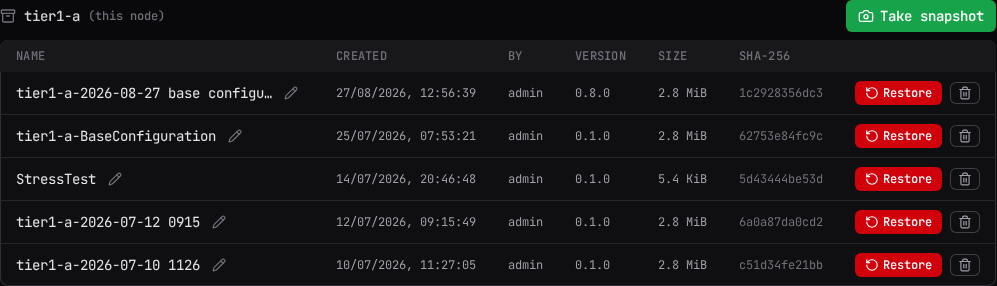
Each snapshot's row shows its name, when it was created and by whom, the product version that took it, its size, and a shortened SHA-256 of its contents.
What a snapshot contains
A snapshot captures the configuration a node runs on:
- The configuration file, byte for byte. Connections, data routes, data view definitions and the general settings all live in that one file, so all of them are captured, comments and key order included.
- The namespace registry, so a restore reproduces the same OPC UA namespace numbering that connected clients have cached NodeIds against.
- The driver device configuration of every driver mount the configuration declares.
- The sidecar device configuration of every sidecar mount. These are captured best-effort: a file the node cannot read is recorded as skipped and the snapshot is marked partial, instead of the whole capture failing.
Nothing is collected by scanning a directory. The node reads exactly the files its own configuration names, and never follows a symbolic link.
What a snapshot does not contain
The following are never captured, and a restore leaves them exactly as they are on the target node:
- User accounts, roles and scopes
- Pending permit queues: remote access users and trusted issuers
- Certificates and private keys of every kind, including connector certificates, the OPC UA trust store, management TLS material and the token signing key
- The list of known peers
- Audit records
- Log files
- Buffered store-and-forward data, receivers and dead-lettered messages
- Cached browse trees and known-client records
Identity and trust have their own lifecycle. A snapshot is readable by an Administrator and can be pushed to another node, so credentials and key material must not travel with it.
Size, compression and partial snapshots
Snapshot files are compressed. The Size column shows the size of the captured content, which does not change when a node starts compressing; hover the figure to see what the snapshot costs on disk once compressed.
A snapshot whose capture could not read everything it set out to is badged partial. Hover the badge for the number of files that were skipped. A partial snapshot restores normally: the group it could not capture in full only adds and replaces files on the target and removes nothing.
Taking a snapshot
Select Take snapshot on a node's section. The dialog prefills a Name built from the node name and the current date and time, which you can overwrite. Taking a snapshot captures the node's configuration exactly as it stands; no restart happens.
Once a node's snapshot store passes 256 MiB, the node still takes the snapshot and returns an advisory naming the total. It appears above that node's list until you select Dismiss. A snapshot is never refused for size; deleting the ones you no longer need is the remedy.
Renaming or deleting a snapshot
Select the pencil icon beside a snapshot's name to rename it in place; press Enter to confirm or Escape to cancel. Select the trash icon to delete it; deletion cannot be undone.
Restoring a snapshot
Select Restore on a snapshot's row.
By default a restore targets the snapshot's own node. If more than one valid target exists in the chain, a picker opens first, offering Restore to any node whose restore permission is open; choosing a different node switches to a cross-node restore. A node running a version that cannot read this snapshot is still listed, marked (needs a newer Flowgate version), and cannot be selected.
The confirm dialog names the snapshot, when it was taken, its size, and what it contains, and
states plainly: the target node restarts immediately. The restore replaces the node's
configuration file and, where the snapshot captured them, its driver and sidecar device
configurations. Nodes connected through it are unreachable until it reconnects. Only the
configuration file is backed up as node.yaml.bak; other replaced files are not.
If the node's current identity no longer matches what the snapshot expects (for example the node was renamed since the snapshot was taken), the restore is refused and a second, stronger confirmation offers Force restore instead.
The dialog carries an explicit warning: restoring this snapshot onto a different node replaces that node's configuration, including its identity, and cannot be verified against it beforehand. A cross-node restore always forces the identity check, since it would otherwise always fail. Users and certificates are not part of a snapshot, so they stay as they are on the target.
Cross-Node restore can be used to create a completely identical setup for a second node for redundancy purposes.
- Configure the first node with all of the connectors that you need.
- Take a snapshot of this configuration.
- Restore the configuration to the second node to create all of the same connectors.
Check that all of the connections on the secondary system are correct and working as you will need to still trust the certificates from external UA Servers.
While a restore is in progress, the page shows "Restoring <node>... the node is restarting;
nodes connected through it are unreachable until it reconnects." The page keeps polling until the
node answers again.
What the node checks before it writes anything
A restore validates first, and nothing on the target changes until every check has passed. Two kinds of answer come back.
Refusals you cannot override. The node has found something it knows to be broken, and the restore stops: a connector in the snapshot that would fail to start after the restart, a device configuration this node's own driver rejects, or a captured file with nowhere valid to be written. Fix the snapshot's configuration, or restore a different snapshot.
Conflicts you can override. The node states each one and offers Force restore, because only you can judge them:
- The snapshot was taken on a node with a different name, so restoring it adopts that identity.
- The snapshot turns the management interface's HTTPS off. After the restart, sign-ins and every other management request would cross the network in the clear.
- The restored configuration points at files that are not on this node. Certificates and keys are deliberately not captured, so this is the warning that a connector or mount would come back pointing at something missing.
Every conflict the node found is reported together, so you see all of them before deciding.
If a restore stops part way
A restore that fails after it has begun writing does not restart the node. It keeps its staged files, and its message names what was written and what was not. Running the same restore again is safe and is the intended remedy: the writes it repeats produce the same result.
A restore overwrites the running configuration
Restoring replaces the target node's configuration file outright, along with any driver and
sidecar device configurations the snapshot captured, and restarts it. Only the configuration
file is backed up as node.yaml.bak; other replaced files are not. Confirm you have the right
snapshot and the right target before you continue; there is no undo beyond restoring a
different snapshot afterward.
Version compatibility
Compressed snapshots are read by this version and by later ones. Where a node in the chain is older, three things follow.
- A node that predates compressed snapshots cannot receive one. The console does not offer it as a restore target, and a push aimed at it is refused with "this node predates snapshot v2 - upgrade it first". Upgrade that node, then restore.
- A node asked to read a snapshot written by a newer build than its own refuses it by name, saying to upgrade the node to restore it.
- A node rolled back to a build from before compressed snapshots lists only the older, uncompressed snapshots that build can read. The newer files are left untouched on disk and appear again when the node is upgraded.
Restoring an old snapshot onto a current node is supported and is the point of keeping them.
When actions are unavailable
Creating, renaming, and deleting a snapshot need config writes enabled for that node. When they
are not, the section shows: "Snapshot changes are disabled for <node>: they require an
Engineer+ role on this console" and, for a node reached through the chain, "and
management.allow_remote_admin on the target node (writes transit every hop's opt-in)." That
section becomes read-only; existing snapshots still list.
Restoring is gated separately from creating, renaming, and deleting: the Restore button appears only when that node's restore permission is open, independent of whether the other actions are.
Related
- Getting Started: the console's other areas.
- Chaining and Reverse Connect: what "over RC" means for a node reached through the chain.