Audit Log
For what the trail records, how its hash chain works, and how retention and pruning behave, see The Audit Chain first. This page covers the console screen itself.
What this page shows
The Audit Log is a read-only, tamper-evident record of who changed what on each node, and of every login, session and certificate decision. Nothing on this page can alter a record, and any alteration to the stored trail invalidates it. Select Refresh to reload it.
Choosing a node and a chain
This page has its own Node selector, separate from the node picker in the title bar: reviewing another node's trail is not the same action as configuring it, so choosing one here does not change which node your other changes land on. A node reached through the chain shows how it is reached, or (unreachable).
A node with an open data-write chain offers a second switch, Security and Data, above the records. A node without one shows the Security trail only, and switching to a node that loses its data chain falls back to Security automatically.
Reading the records themselves requires an Administrator role scoped to the node you selected, or that the node is running with management authentication turned off; without either, this page shows only the chain status banners below. See The Audit Chain for the full model.

Viewing and filtering the trail
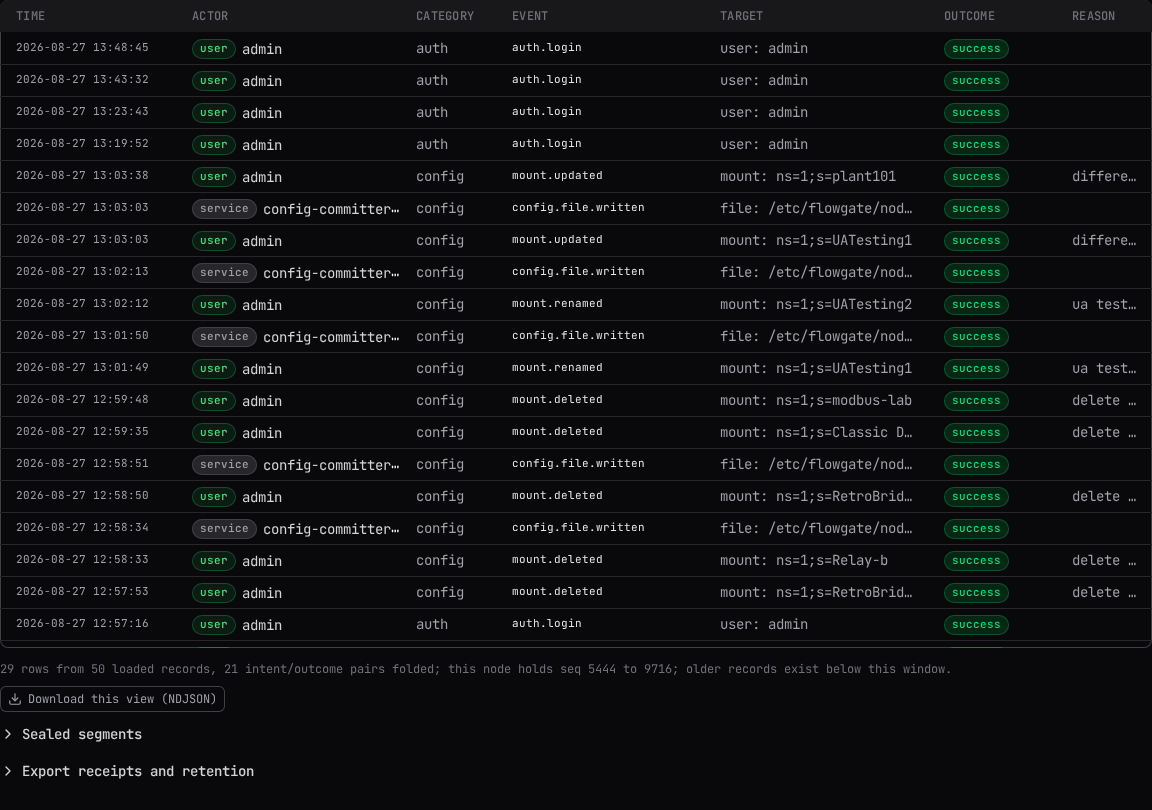
The page opens on Live tail: the newest 50, 100 or 200 records, with Follow tail on by default so new records append as they arrive. Switch to History to page forward through the whole chain from wherever you choose, using Back and Next.
Three checkboxes shape the view without narrowing the chain itself: Fold intent and outcome (one row per action) merges a resolved intent/outcome pair into a single row, on by default; Findings only (indeterminate and disputed rows) shows just the rows a reviewer has to look at, among what is already loaded; Hide lifecycle records (heartbeats, sessions) hides chain heartbeats and the routine half of the session lifecycle, on by default, with a Show them link when it is active.
Select Filters to open the filter form: a date-and-time range, and closed-vocabulary fields for Category, Outcome and Actor class, plus free-text fields for Event (matched as a prefix), Actor (an exact id), Target kind, Target id, Correlation id, and Text (matched across event, target, reason and error). Select Apply filters to run it, or Clear filters to reset. There is no filter for node: this page always reads the one chosen above.
A rejected value never returns an empty page
Category, Outcome and Actor class only accept the node's own vocabulary. A value outside it is refused outright rather than answered with zero matching records, so an empty result always means nothing matched.
Below the table, a line states how many records are shown against how many were loaded, and whether more exist beyond the current window, whether the walk stopped at the node's own scan budget, or beyond the end of a scrolled page. Select Download this view (NDJSON) for a plain copy of exactly what is loaded; it is a convenience copy, not a signed export, and cannot be verified offline. See The Audit Chain for the difference.

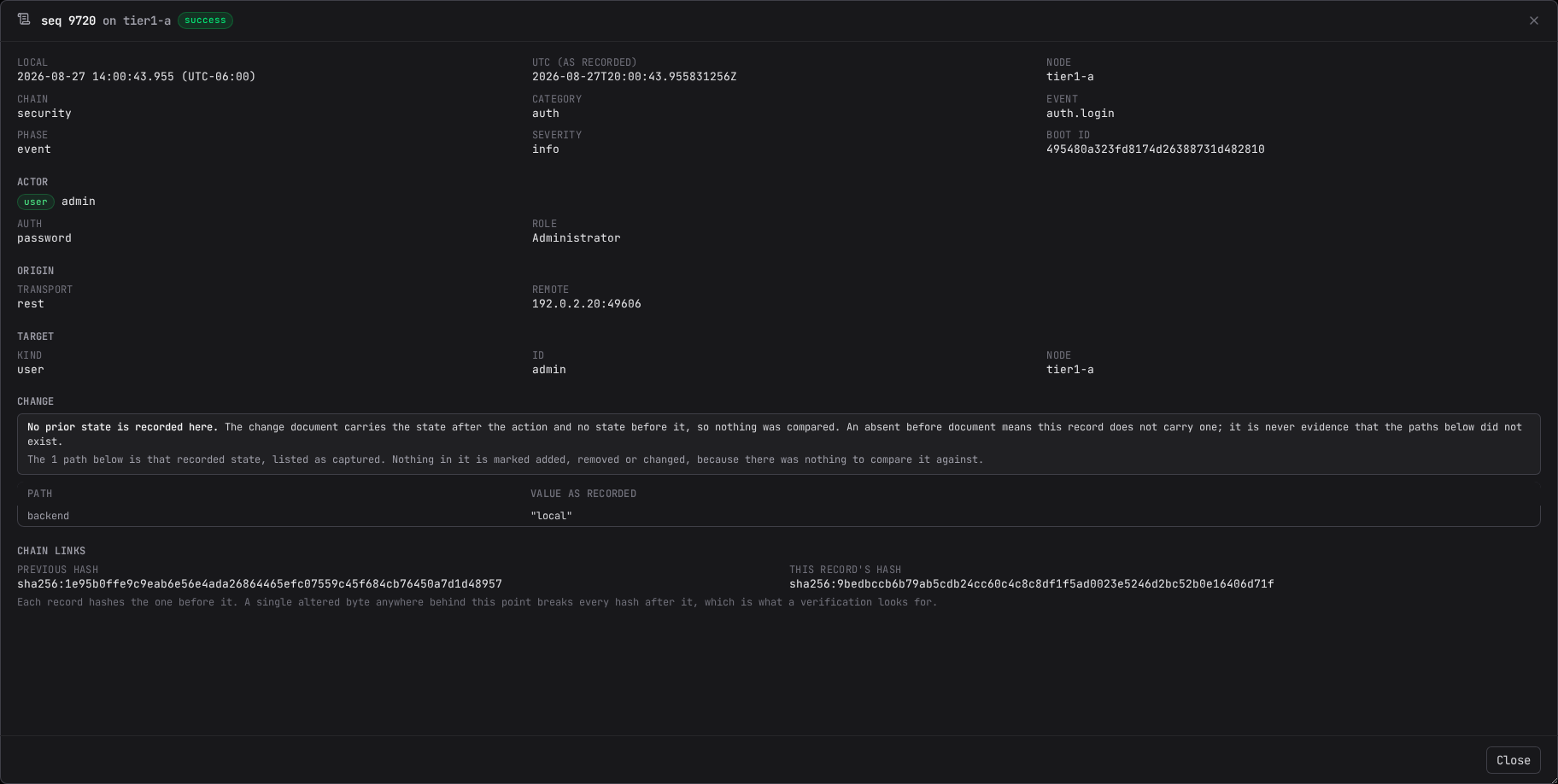
The record detail drawer
Select any row to open its full record: reason, actor, origin, target, the chain links (this record's hash and the one before it, so that a single altered byte anywhere behind it breaks every hash after), and, depending on the record, its configuration change, its data write, or the session it describes. A configuration change is shown as a before/after table per changed path; a value that looks like a credential is replaced with a short digest stub instead of shown in the clear, and a very large document caps its rows until you ask to see the rest.
If the record carries a correlation id, Show related opens every record sharing it across the nodes reachable from here, grouped by the node that wrote it and the transport the action arrived on: one operator action can write a record where it was issued and a separate one at every node that carried it out.
Chain status, compliance and automatic cleanup
Above the records, three cards report on the chain independently of which node's trail an Administrator can read: Chain status (the state described in The Audit Chain), a GxP posture card for compliance-relevant checks, and a note on the data-write chain's own condition when it applies, including a count of writes refused for want of trail headroom and any sessions the node could not attribute. A fourth line states whether automatic cleanup can currently drop anything on this chain. All four open automatically when they have something wrong to report, and stay collapsed otherwise.
Compliance mode also requires the management listener to serve TLS 1.3 only; the posture card lists that floor as one of its checks.
When a chain is sealed, Acknowledge the discontinuity appears on the node itself, to an Administrator, or to anyone if that node's management authentication is turned off. The confirmation asks for a reason and states plainly: "Acknowledging repairs nothing. The records either side of the break are unchanged, the link across it stays unverified, and every verification of this chain will keep reporting it. What changes is that the node stops refusing changes." See The Audit Chain.

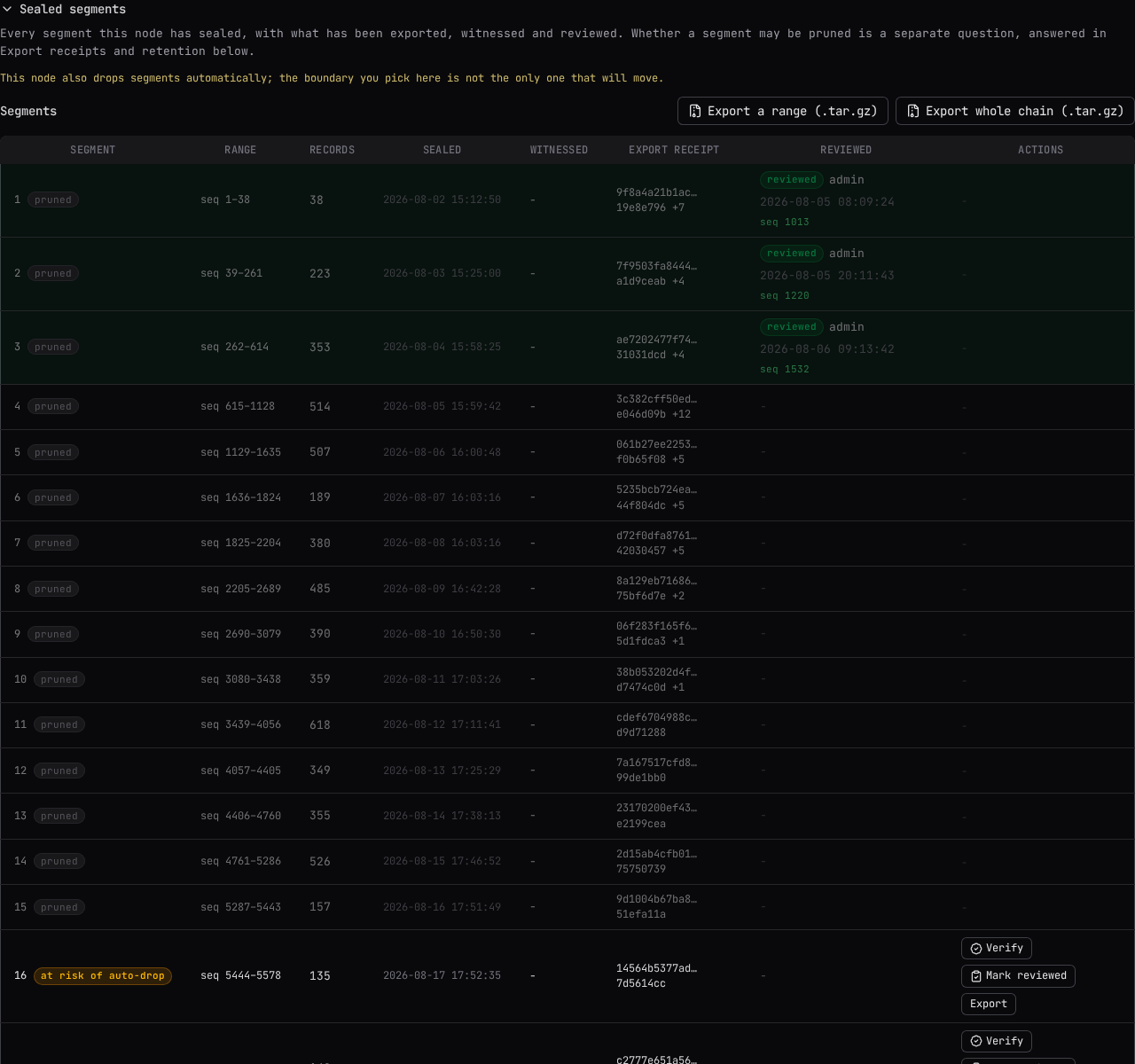
Sealed segments: verify, review and export
Closed by default. Opening Sealed segments lists every segment this node has sealed, with what has been exported, witnessed and reviewed. Each row offers:
- Verify re-reads the segment on the node itself, re-computes its hashes and checks its seal, and reports how many records were checked, whether it passed, the first bad sequence number if it did not, and any anomalies found along the way. A single online run covers at most 25,000 records. This is the bounded, on-node check; the strongest evidence is still an offline verification against an exported bundle, using the vocabulary in The Audit Chain.
- Mark reviewed records that a periodic review of exactly that segment was carried out, with an optional finding. It adds a new record; it does not annotate the segment, and it is an ordinary audited record naming who reviewed it, not a sign-off ceremony.
- Export downloads a signed bundle covering exactly that segment.
The unsealed tail offers Verify only; it has no seal yet, so it is not offered for export or
review on its own, only as part of a range or whole-chain export. On the connected node, two more
buttons sit above the table: Export a range (.tar.gz), over any sequence range you choose, and
Export whole chain (.tar.gz), one archive holding every sealed segment plus the unsealed tail,
each independently verifiable. Every export is a .tar.gz holding the exact stored records, the
seals covering them, and a manifest signed with the node's own audit key; because the archive is
what a later prune is measured against, an export that asks for a reason makes it mandatory,
regardless of this node's own reason policy elsewhere. After it downloads, a receipt banner shows the bundle's digest
with a copy button and reminds you to verify the file itself before recording that digest anywhere
it will be relied on.
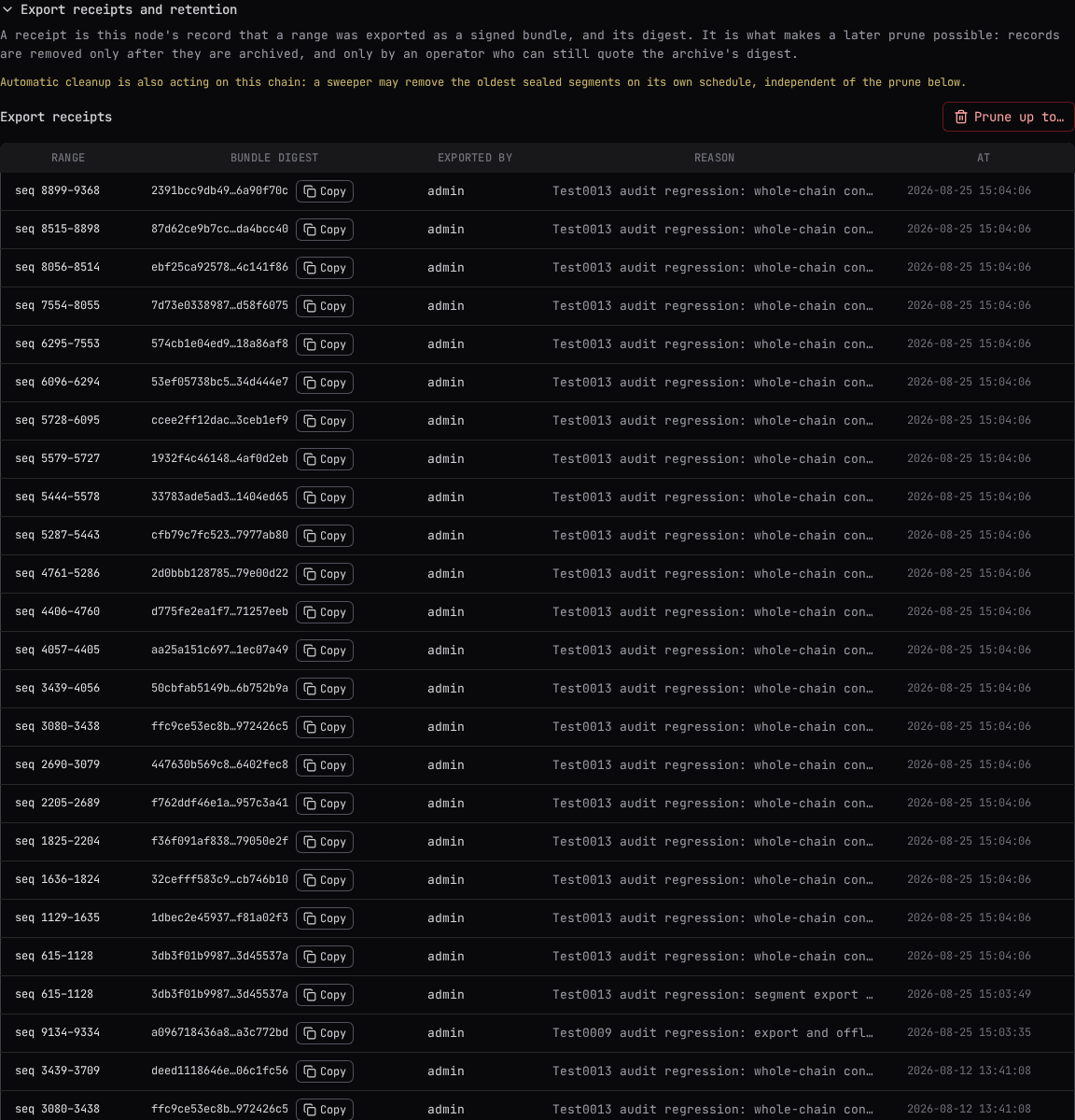
Export receipts and pruning
Closed by default. Opening Export receipts and retention lists every export receipt this node holds (the range it covers, its bundle digest, who exported it, their reason, and when), and, on a node with a parent, the upstream witness receipts covering its segments.
Prune up to… permanently destroys records
This destroys audit records on the node whose trail you are viewing, and the only copy left afterward is the export bundle you name. The boundary is chosen from a dropdown of prunable sealed segments, never typed freely, and you must paste back the archived bundle's digest, read from its manifest, not copied from this page. The node itself enforces every condition: the range must sit wholly inside sealed segments, be covered by a verified export, clear the retention floor, and, on a node with a parent, be witnessed upstream. See The Audit Chain for what each condition means.
If automatic cleanup is also on for this chain, a note reminds you it may already be removing segments on its own schedule, independent of a manual prune.
Audit settings
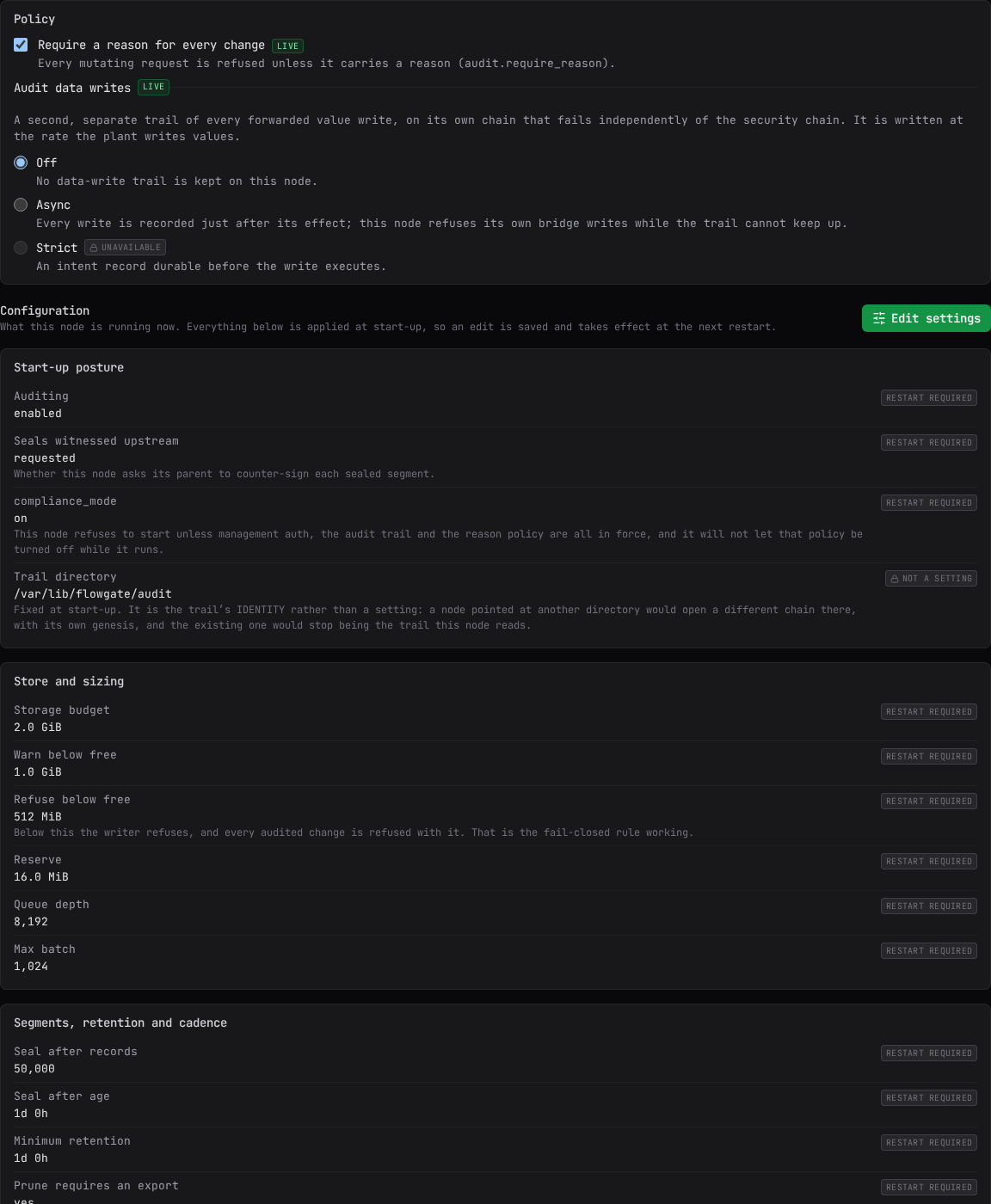
Select the Audit settings tab, gated the same way as the trail itself. If this node keeps no trail at all, the tab instead offers Enable audit: turning it on creates the on-disk store, this node's own audit signing key, and the chain's genesis record at the node's next restart.
Two controls apply immediately:
- Require a reason for every change - whether every change request to this node must carry a reason. A confirmation asks for a reason only when an audit trail would record it: this node's trail is on, or, for a change to a downstream node, that node's trail is on or cannot be read (it is read once per sign-in, by an Administrator). With every trail involved off, the reason field is left out, including for updates and audit exports, which make the reason mandatory while this node's own trail is on. If a node refuses the change without a reason, the confirmation reopens with the field, now mandatory.
- Audit data writes - Off, Async (the default once turned on) or Strict, which is not available in this release. Turning it on or off is confirmed before it applies. Whether the chain records every write or a filtered scope is shown here for information only; it is set outside this console. See Data Views for excluding a view's tags from a filtered scope.
Everything else is shown as a read-only Configuration block: start-up posture, storage sizing, and segment, retention and cadence settings. Select Edit settings to change them. Most fields take effect only at the node's next restart, and a banner appears once a saved change is waiting for one; automatic cleanup's on/off switch, its age limit, its record limit, and its on-screen countdown apply immediately instead, while the minimum-retention floor itself still takes effect only at the next restart.
Related
- The Audit Chain: what is recorded, how the hash chain and retention work, and the chain states this page's banners report.
- Data Views: excluding a view's tags from a filtered data-write audit scope.
- Getting Started: roles, and where this page sits in the console.