Settings
What this page shows
Settings groups six things: your account, this browser's own preferences (stored locally, not on the node), this node's management and security toggles, its identity (name and OPC UA port), its management TLS posture, and a read-only view of its full configuration. The update feed setting is not here: see Updates for the Update feed panel and the Check for Updates button.
Account
Shown only when authentication is enabled (there is a signed-in session to describe). Displays your username, your role on each node you have access to, and whether you signed in locally or through a directory (AD/LDAP). Select Sign out to end your session.

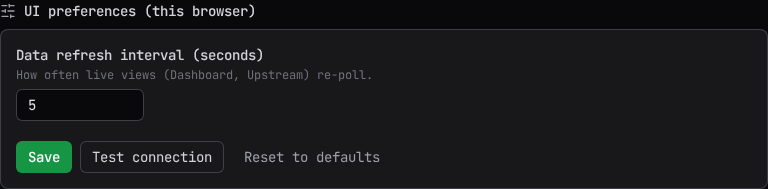
UI preferences (this browser)
Data refresh interval (seconds) controls how often live screens (Dashboard, this page's own polling panels) re-poll. It is stored in this browser, not on the node. Select Save to apply it, Test connection to confirm the console can reach the node right now, or Reset to defaults to restore the shipped values.
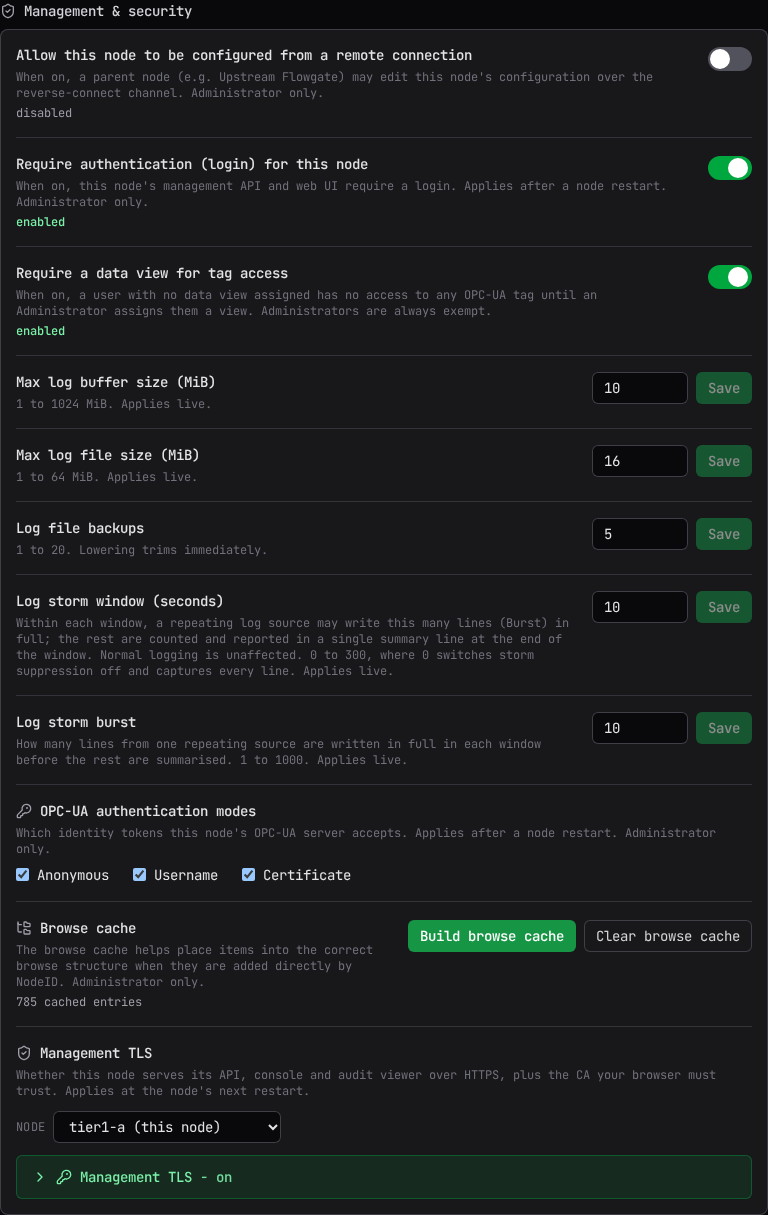
Management and security
Every control in this section is Administrator-only; a non-Administrator sees the same information locked, with a note that only an Administrator of this node can change it. Every change here goes through a confirmation dialog that states what it does and whether it applies live or after a restart.
| Setting | What it does | Takes effect |
|---|---|---|
| Allow this node to be configured from a remote connection | Lets a parent node edit this node's configuration over the reverse-connect channel. | Live |
| Require authentication (login) for this node | Whether this node's management API and web UI require a sign-in. Turning it on is refused until this node has an administrator, because the node would not start: create one on the node with flowgate auth seed-admin (it works while authentication is off), then turn this on. Turning it off means anyone who can reach the node on the network can read and change its configuration. |
Restart |
| Require a data view for tag access | A user with no data view assigned has no OPC-UA tag access at all until an Administrator assigns one. Administrators are always exempt. | Live |
| Max log buffer size (MiB) | 1 to 1024. | Live |
| Max log file size (MiB) | 1 to 64, the size cap on each rotated on-disk log file. | Live |
| Log file backups | 1 to 20 rotated backup files kept. Lowering it trims immediately. | Live |
| Log storm window (seconds) | 0 to 300. Within each window a repeating log source writes its Burst allowance in full; the rest are counted and summarized in one line at the end of the window. 0 turns storm suppression off and captures every line. | Live |
| Log storm burst | 1 to 1000 lines from one repeating source written in full per window before the rest are summarized. | Live |
| OPC-UA authentication modes | Which identity tokens (Anonymous, Username, Certificate) this node's embedded OPC-UA server accepts. Affects external clients and node-to-node links alike; a link whose token type you remove stops connecting. A node installed by the Windows installer starts with Anonymous off and Username and Certificate on, so a link to it must carry a username or a certificate. | Restart |
Since 0.44.0 a new installation starts with Anonymous access off and Username and Certificate sign-in on. A node that already ran keeps its setting, and the console says so with a notice above the checkboxes until an Administrator saves them or the node restarts. A node that refuses anonymous can be mounted only by a parent that signs in with a username, or with a certificate bound to a user on this node.
Turning off authentication is a real security change
The confirmation reads: "If Authentication is turned off for this node its management API and UI will NO LONGER require a login: anyone who can reach this node on the network can read and change its configuration. Changes are still recorded in the audit log, but they are all attributed to anonymous, so the log cannot tell you who made them."
A Browse cache control appears on a node that supports it. Clear browse cache drops the cached placement hints, after which a directly-addressed item may appear under its connection folder until the tree is browsed or built again; live client browses are unaffected.
A Restart node action appears whenever a change here is waiting on a restart to take effect. Restarting briefly disconnects live views.
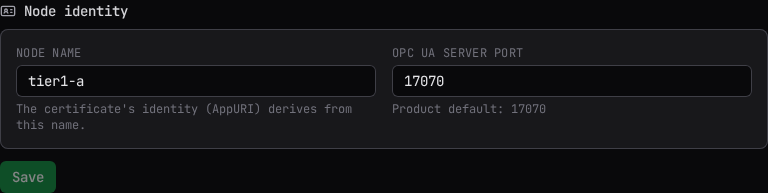
Node identity
Shown only on a node with an embedded OPC-UA server. Edits the Node name and the OPC UA server port together; both apply on restart, and until then the running node keeps serving under its old name and port.
Renaming this node regenerates its certificate
A rename regenerates the node's certificate in the same apply, because the certificate's identity (AppURI) derives from the node name. Every current connection, parents, relays, and OPC-UA clients alike, must re-trust the new certificate before it works again. You must check a confirmation box acknowledging this before Save enables. A node whose identity is pinned to an explicit AppURI is the exception: renaming it does not regenerate the certificate.
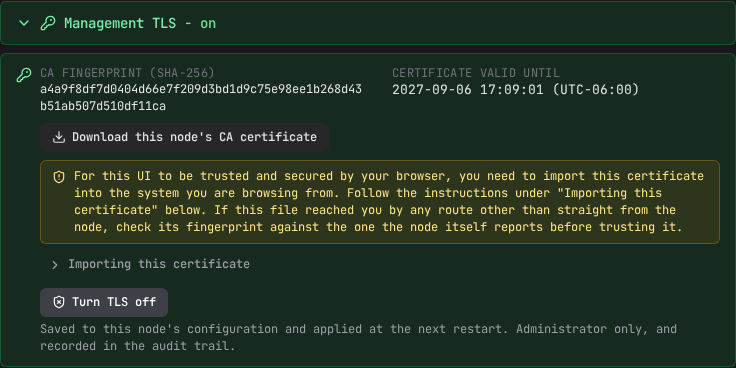
Management TLS
Whether this node serves its management API, console, and audit viewer over HTTPS, plus the CA your browser must trust. This card carries its own node selector, separate from the rest of the page, because a relay behind an OT boundary is reachable only through its parent: without a remote form, such a node could never be moved onto TLS by anyone without a shell on the machine.
The card shows two related but different facts: what the selected node is serving right now, and what its saved configuration will serve at its next restart. When they differ, a restart banner appears naming both. Select Turn TLS on or Turn TLS off to change the saved setting; it takes effect only once that node restarts.
Turning TLS off is stated plainly, not softened
Turning TLS off is confirmed with the actual consequence spelled out before anything about restarts, because it is the more consequential direction.
When TLS is on for this node (not a remote one), the card offers Download this node's CA certificate and, under Importing this certificate, per-platform steps for trusting it. If your browser warns about the console or hides the option to proceed, see Trusting the console certificate.
Restarting a node to change its transport changes the address it answers on (http:// to
https:// or back). For this node, the page you are on stops reconnecting and names the new
address to open instead. For a remote node, this page is unaffected and simply shows that node
again once it reconnects.
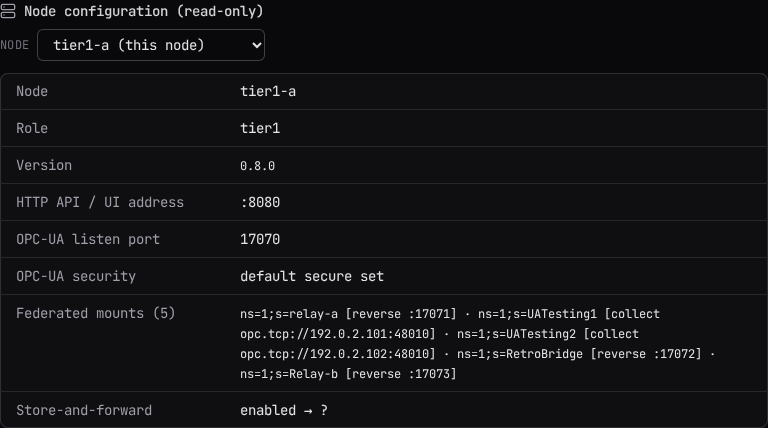
Node configuration (read-only)
Select a node from the selector to see its configuration: node name, version, HTTP API/UI address, OPC-UA listen port and security, its parent uplink(s), its federated mounts, and its store-and-forward status. This view cannot be edited here; make configuration changes on Connections, Data Routing, or the other write surfaces this console offers.
Related
- Chaining and Reverse Connect: the ports and certificates a node identity change and a management TLS change both interact with.
- Getting Started: roles, and where each write surface lives.
- Updates: update status for every node, checking the feed now, applying an update, and the manual update from a file.