Data Routing
What this page shows
Data Routing lists every configured data route, one section per node in the chain (this node first, then each manageable node below it).
This panel allows you to move tags from any source to a destination within the connected network. The data route itself can live in any Flowgate node and manage its own data movement. It is recommended that you configure the data route within the node that is closest to the data source and destination. For example, if both the source and destination are connected to the Relay within the L3 network then it should live there rather than being connected up through the L4 network.
Where to configure a route
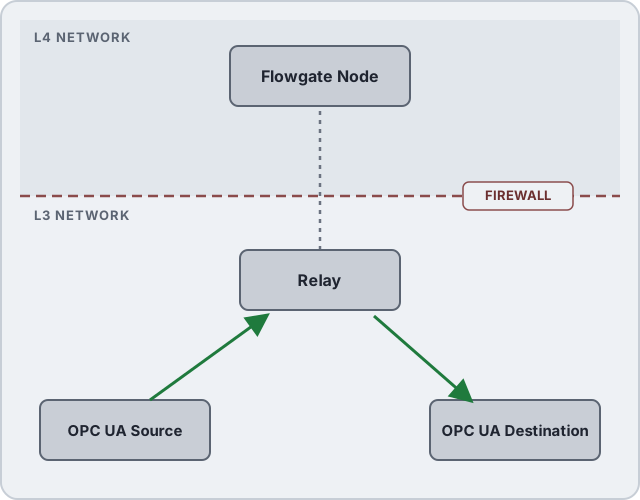
The green arrows are the route's data path: source up to the Relay, Relay down to the destination. The gray line is the Relay's management uplink to the Flowgate node on the L4 network, above the firewall; it carries no route data, only configuration and status.
A route collects tags under a source connection and delivers them to one of three kinds of destination: an outbound connector (publish), another mount (a one-way write bridge), or nowhere but the durable store-and-forward stream (feed). A route's badge shows which.
Reading a route card
A route's collapsed row shows its id, source -> destination, its badge, and, when
present, apply error (the whole route failed to apply), S&F (store-and-forward is on for
this route, with the uplink it rides when the node has more than one), disabled (the route
is parked), and unaudited (audit writes is off for this route). The green number is the
route's measured updates per second delivered to its destination; a red count shows how many
mapped tags currently have a source or destination error.
Expand the row for the full detail: publish rate, sample rate, queue size, updates per second, error count, whether store and forward is on, and, for a bridge, whether its writes are audited.

Creating a data route
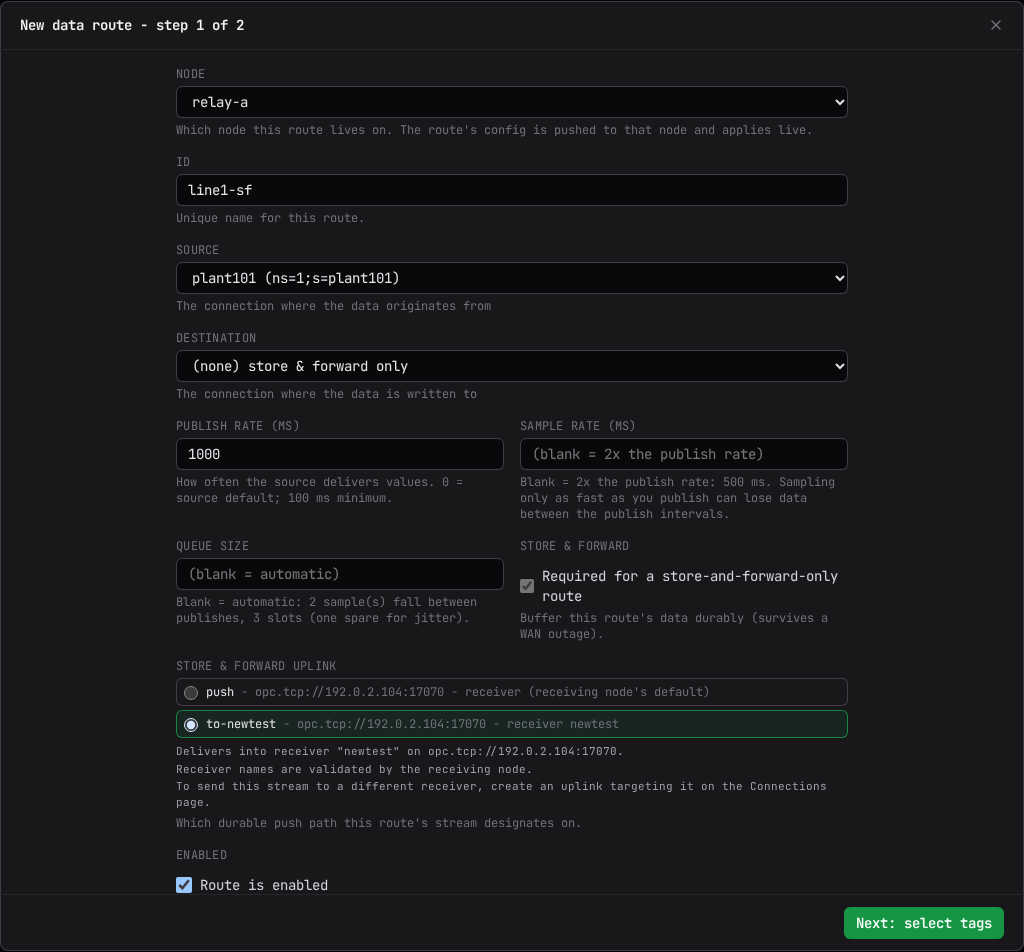
Select New data route, then work through the two-step wizard.
Step 1 - route settings.
| Field | What it does |
|---|---|
| Node | Which node the route lives on (only shown when more than one node can host a route). Locked once you start editing an existing route. |
| ID | A unique name for the route. |
| Source | The connection the data originates from. |
| Destination | (none) store & forward only, a connector under Publish to connector, or a mount under Write to mount (bridge). |
| Publish rate (ms) | How often the source delivers values. 0 means the source's own default; 100 ms is the platform floor. |
| Sample rate (ms) | How often the server samples the tag. Blank means twice the publish rate. -1 means the fastest the platform allows. |
| Queue size | Server-side queue depth between publishes. Blank means automatic, sized from the publish and sample rates. |
| Store & forward | Buffers this route's data durably so it survives a WAN outage. |
| Audit writes | Bridge routes only. Whether this route's writes are recorded in the node's data-write audit chain while that chain runs a filtered scope. |
| Enabled | Uncheck to park the route: its definition is kept, and stays editable, but it collects and delivers nothing until re-enabled. |
The wizard blocks a publish or sample rate below the 100 ms platform floor, and shows what the node will actually request once any blank field is resolved.
If store and forward is on, the wizard shows the uplink this route's stream rides and where that uplink delivers. A node with exactly one uplink selects it automatically; a node with more than one requires a pick before you can continue; a node with none shows that nothing will be spooled until an uplink exists.
Picking the uplink is also picking the receiver. The stream lands in the chosen uplink's own
Target receiver on the receiving node, and there is no per-route receiver setting: to land
this route's data in a different receiver, create another uplink targeting that receiver on the
Connections page and put the route on it. (A route configured by
hand in the node's config file with its own sf_receiver shows that value read-only here, and
the node refuses one that does not match its uplink's receiver.)
Two store and forward routes may ride different uplinks, but they must not select the same tag: each tag rides exactly one durable path. See Separate store and forward streams for how routes, uplinks and receivers make independent streams.
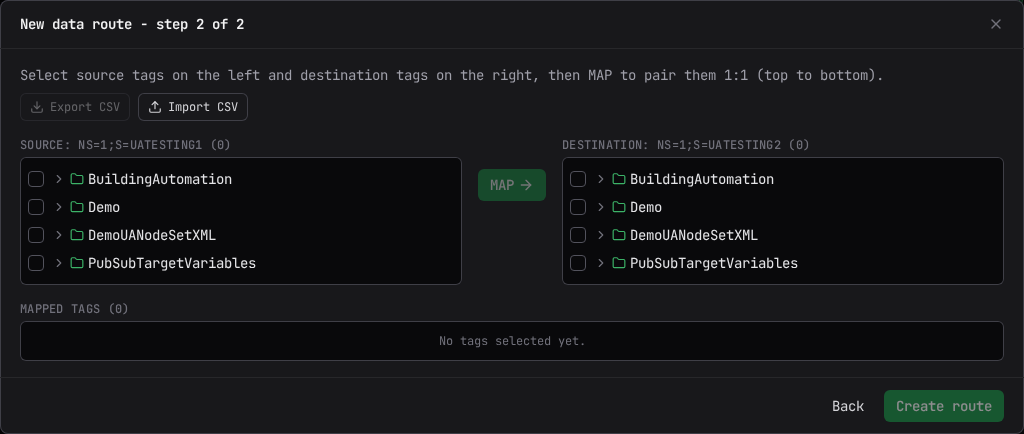
Step 2 - select tags. Browse the source connection's tree and check the tags to move.
Every checked tag is included. Check a folder to select every tag beneath it.
Check source tags on the left and destination tags on the right, then select MAP to pair them one to one, top to bottom, in the order shown. The preview panel shows the pairing before you commit it: a row missing either side is left unpaired and stays in the selection, never silently dropped. Drag one side of a row onto another row to swap them.
Select Export CSV to download the current mapping set, and Import CSV to load one back; the two round-trip the same file. Select Create route (or Save changes when editing) to commit. The confirm dialog summarizes the whole route, including which uplink it rides and whether it is saved disabled.
The CSV file format
The file has a header row naming its columns, matched case-insensitively in any order. A header
name may carry an (optional) suffix, matching what Export CSV itself writes; the suffix is
stripped before matching, so an exported file re-imports unchanged. A line starting with #,
and any blank line, is skipped.
| Column | Required | What it holds |
|---|---|---|
source_node_id |
Always | The source tag's NodeId, for example ns=2;s=Demo/Line1/Temperature. A row without one, or a NodeId that does not parse, is rejected; so is a source repeated on a later row. |
dest_node_id |
Bridge routes only | The paired destination tag's NodeId. Required on every row for a bridge route; a route with no destination mount must leave every row's dest_node_id blank. |
source_path |
Optional | The source tag's browse display path. Leave it blank and the console fills it in the next time the tag is browsed. |
source_node_id,dest_node_id,source_path(optional)
ns=2;s=Demo/Line1/Temperature,ns=3;s=Historian/Line1/Temperature,plant/line1/temperature
ns=2;s=Demo/Line1/Pressure,ns=3;s=Historian/Line1/Pressure,
source_node_id,source_path(optional)
ns=2;s=Demo/Line1/Temperature,plant/line1/temperature
ns=2;s=Demo/Line1/Pressure,
The mappings table
Expand a route with tag mappings to see the Mappings table: every source tag (and, for a bridge, its paired destination), each with its own source and destination status. A status column's first click sorts errors to the top; click again to reverse it.
Expand a single mapping row for its detail. With writes enabled, the source NodeId (and, for a bridge, the destination NodeId) is editable in place: change either and select Commit to apply it immediately and live, releasing the old subscription and opening the new one. Select Refresh on an unchanged mapping to remove and re-add its live items, a way to un-stick a tag whose error never clears without changing the route's definition.
Store and forward egresses
Shown above a node's route cards, grouped by receiver, on any node that has receivers: each Store & Forward Receiver from the Connections page gets its own egress list here, the outbound connectors its backlog drains into. Select New egress on a receiver to give it a Name and a Sink (an outbound connector). On a node that also has store-and-forward uplinks, you can instead choose Forward onward through an uplink and pick one of the node's own uplinks; an egress has a sink or an uplink, never both, and that kind is fixed when the egress is created. Once a node forwards a child's durable stream, that child's tags reach the parent only through that stream. If the node refuses the choice, its own sentence is shown. Creating a receiver's first egress, or one on a Sparkplug B sink, applies on restart; otherwise it applies live.
An egress delivers everything its receiver accepts
An egress cannot filter what it delivers. To send a different set of data elsewhere, create another receiver on the Connections page rather than a rule here.
An egress card shows its running state (running, held, error, or disabled), its records backlog, and its drain rate. The enable and disable switch never loses data: "Cursor held; re-enabling backfills from where it stopped." Deleting an egress discards whatever backlog it was still holding for delivery; changing its sink stops it and restarts it on the new connector, and whatever it had not yet delivered follows to the new destination.

When writes are disabled
If config writes are turned off, the page shows: "Config writes are disabled. Set
management.allow_writes: true on this node (and allow_remote_admin on a relay you want to
configure over the chain). This page is read-only." Existing routes and their mapping status
still display; only editing is blocked.
Related
- Store and Forward: what buffering a route actually does, end to end.
- Connections: configuring the uplinks and receivers an egress or a store-and-forward route depends on.
- Chaining and Reverse Connect: how demand-driven collection reaches the source a route names.